SSH Log Parser & Security Event Normalizer
A Python automation script that parses raw Linux SSH authentication logs, identifies failed login attempts, and converts them into structured JSON security events.
Project Overview
SSH authentication logs contain useful security information such as login timestamps, usernames, and source IP addresses. However, this information is stored as raw text, which makes it harder to process automatically.
I built this project to automate the first step of analyzing these logs. The Python script searches for failed SSH authentication attempts, extracts the relevant information, and converts each event into a consistent JSON structure.
This creates a simple example of how raw security telemetry can be transformed into structured data for further analysis or use in security tooling.
Architecture & Tech Stack
Language: Python 3
Input: Linux SSH authentication logs
Output: JSON
Techniques: String parsing, file I/O, data normalization
Implementation Phases
Phase 1:
Log Input and Event Filtering
I started with a sample Linux SSH authentication log containing
different login attempts. Rather than manually searching through
the entire file, the Python script reads the log line by line and
looks specifically for entries containing
Failed password.

Phase 2:
Parsing the Log Data
Once a failed authentication event is identified, the script
splits the log entry into individual fields. It extracts the
timestamp, username, and source IP address from the original
log line.
I also accounted for a second SSH log format involving an
invalid user. The parser checks for this case and
adjusts how it locates the username so both types of failed
authentication events can be processed.
Phase 3:
Security Event Normalization
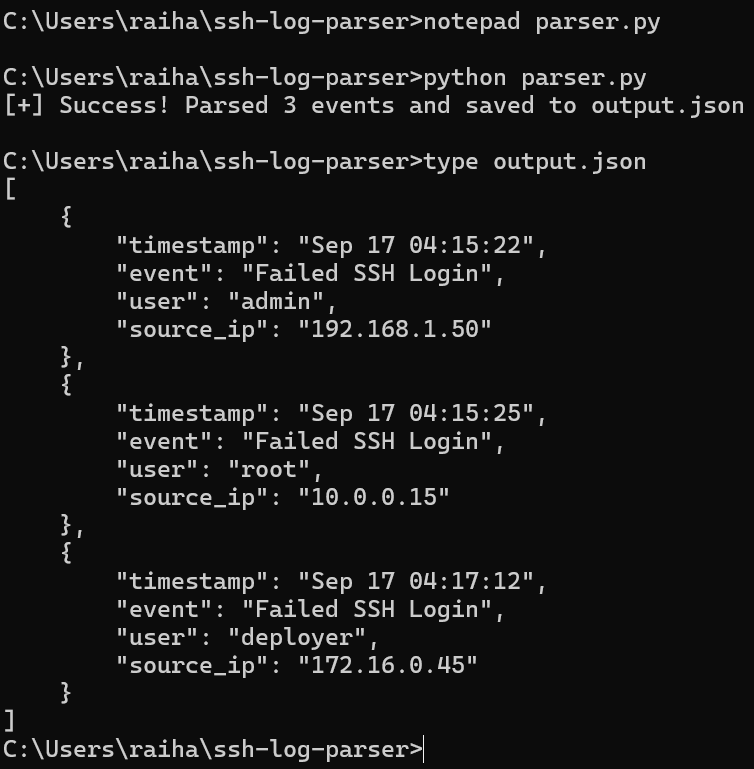
After extracting the relevant fields, the script stores them
in a Python dictionary using a consistent structure. Each event
contains the timestamp, event type, username, and source IP address.
{
    "timestamp": "Sep 17 04:15:22",
    "event": "Failed SSH Login",
    "user": "admin",
    "source_ip": "192.168.1.50"
}
Phase 4:
JSON Output
Finally, the parsed events are written to
output.json using Python's built-in JSON module.
This transforms the original unstructured log data into a format
that is easier for other programs and security tools to process.
Security Relevance
Failed SSH authentication attempts can be useful when investigating unauthorized access or potential brute-force activity. Converting raw authentication logs into structured events makes the information easier to search, analyze, and correlate.
While this project is intentionally lightweight, the workflow represents a basic security telemetry pipeline:
Raw SSH Logs
     ↓
Python Parser
     ↓
Failed Login Detection
     ↓
Field Extraction
     ↓
Structured JSON
     ↓
Security Analysis